
Last Modified : 08 August 2026
Event Configuration
An Event Configuration is the top-level building block in Overseer. It defines what to monitor, when to check, how to detect changes, and what to do when an event occurs.
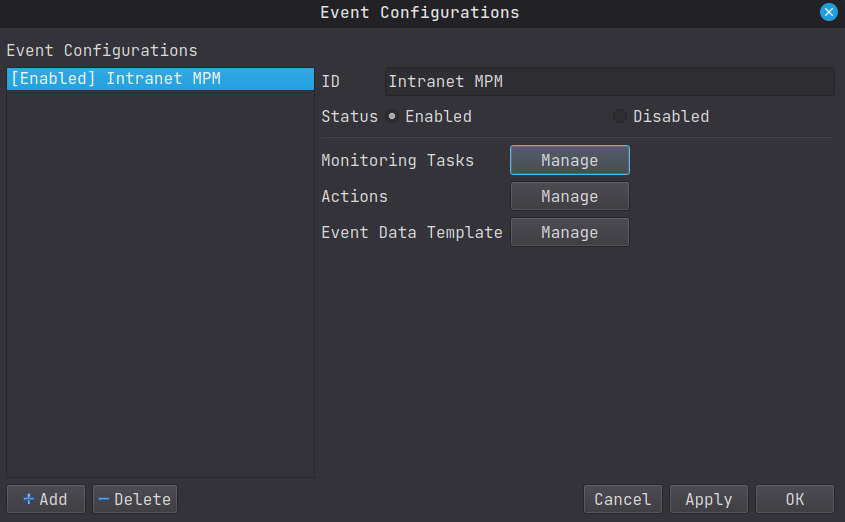
Each event configuration consists of three main components:
- Monitoring Tasks : Define the schedule and trigger logic for detecting events.
- Actions : Define what happens when an event is detected (e.g., send a notification, run a custom command).
- Event Data Template : Defines how the raw data from a trigger is interpreted and stored as structured event data.
How It Works
An event configuration ties together all the pieces of the monitoring pipeline:
- A Scheduler determines when a monitoring task runs (every N minutes, on a cron schedule, at an exact date/time, etc...).
- An Event Trigger performs the actual check : fetching a website, running a custom command, always firing, etc...
- A State Storage persists the previous state so the trigger can compare new results against old ones (e.g., detecting website changes via hash comparison).
- When any of the triggers detect a change, the Event Data Template transforms the raw output into structured data, and all enabled Actions are executed.
Configuration Options
| Option | Description |
|---|---|
| ID | A unique identifier for the event configuration. Can be alphanumeric. |
| Enabled | Whether the entire configuration is active. When disabled, no monitoring tasks will run and no actions will be executed. |
| Event Data Template | Determines how incoming trigger data is parsed. For more informations, see Event Data Templates |
An event configuration can have
multiple monitoring tasks and
multiple actions. Each monitoring task runs
independently with its own scheduler and trigger.