
Monitoring Tasks
A Monitoring Task is the core execution monitoring unit in Overseer. It combines a scheduler, a trigger, and a state storage to periodically check for events.
Each monitoring task belongs to an Event Configuration and defines when to run (scheduler), what to check (trigger), and how to remember previous results (state storage).
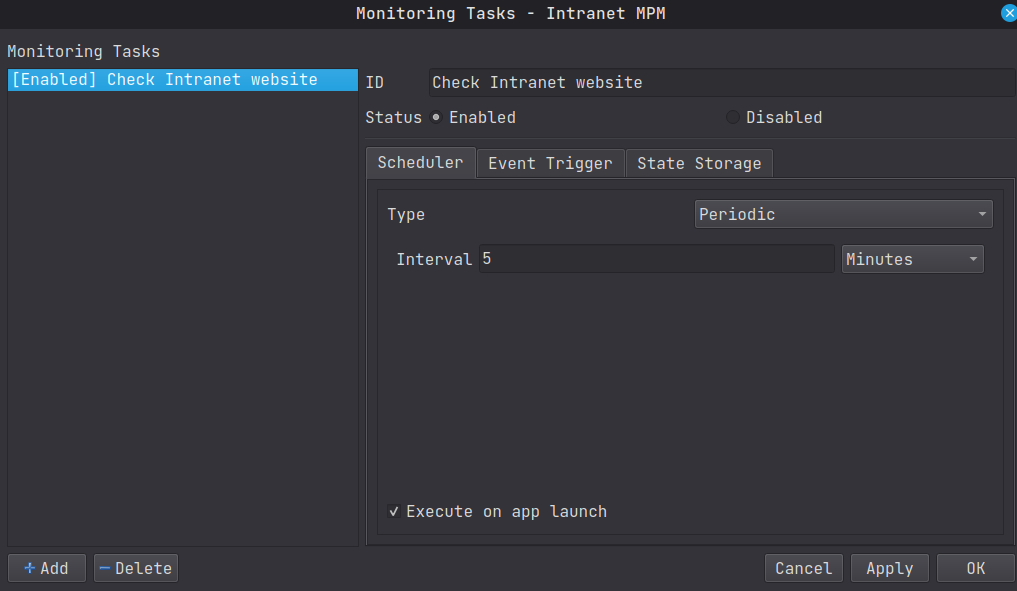
Components
A monitoring task is composed of 3 sub-components:
Scheduler
Determines when the task executes. Currently supports the following scheduler types:
- Cron Scheduler : Uses cron-like expressions.
- Periodic Scheduler : Runs at a fixed interval.
- Exact Date Time Scheduler : Runs once at a specific date and time.
See the Schedulers section for detailed documentation on each type.
Event Trigger
Performs the actual check and determines whether an event occurred. Currently supports the following trigger types:
- Always Trigger : Fires on every execution with a fixed data payload.
- Simple Web Checker : Monitors a URL for content changes using SHA-256 hashing.
- Custom Trigger : Runs an external command/script that reports events via JSON.
See the Event Triggers section for detailed documentation on each type.
State Storage
Persists the previous state between executions so the trigger can detect changes. Currently supports the File System Storage, which saves state to a file on disk.
Configuration Options
| Option | Description |
|---|---|
| ID | A unique identifier for the monitoring task. |
| Enabled | Whether this task is active. |
| Run on Startup | If enabled, the task executes immediately when the application starts, regardless of the scheduler. |